@joe.ferris I’m also having to reauthenticate periodically. I think they’re working on the Tuya server - this is what I received a few minutes ago:
Thanks @johnmann - good to know not just me.
As you say hopefully they are just doing some maintenance work so this will stabilise then. 
Hi Joe,
do you need to do this because of missing data updates, or because you see an authentication error on the connection page?
Hi @pebneter
Its because I get the red authentication failure error on the TUYA integration page in Apilio (Can’t remember the exact wording).
Hi all,
so here’s a short post-mortem:
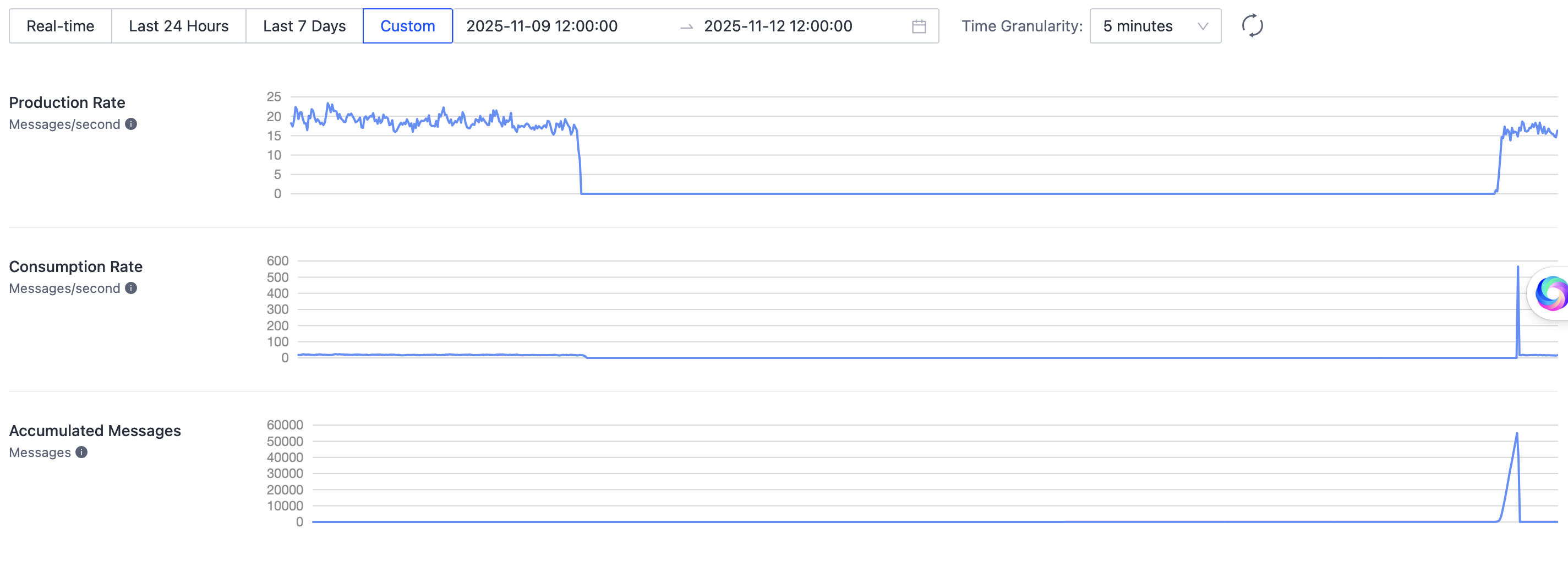
- At around 3am UTC, on November 10, Apilio did not receive anymore device updates
- Tuya support looked into the issue, but they couldn’t locate or fix the issue
- I switched the Tuya queue to another one to restore functionality for Apilio users as soon as possible, but it didn’t work
- On November 12, around 7am (~48 hours later), device updates suddenly started to come in again
- I received a message that messages started to accumulate in the original message queue
- I switched Apilio back to the original message queue, since then it seems to be more or less fine again
Learnings:
- I contacted Tuya again and asked them to research why this incident happened
- The message queues that Apilio uses are quite old (5 years), and in the meantime, Tuya introduced new features
- The new authentication flow is different and I was not able to get it working with Apilio
- I will research how the new authentication method works for the Apilio use case, so that Apilio could switch to a more recent queue version
1 Like
I will check why this happens.
2 Likes
@pebneter Just in case it helps with regard to a timeframe it seems to have happened now.
“Error fetching device list. Please try to re-authenticate.”
But what’s interesting is that I tried switching a light on and off without reauthenticating and the device status in Apilio updated? I wasn’t expecting that.
@joe.ferris @pebneter I can confirm @joe.ferris 's finding - at present, my “Connection Channels” page shows “Error fetching device list. Please try to re-authenticate.” but the data from my devices is still being fetched from and sent to Tuya. I’m not going to re-authenticate, and we’ll see how long it continues to remain attached.
1 Like
Hi @johnmann,
but it doesn’t show an error right now, correct?
If you see the error next time, can you not re-authenticate, so that I can check the error details.
To be fair, they do run regional datacenters for each region. For instance, the European users are served from Frankfurt, hosted at AWS (if my IP address research is correct). Of course we don’t know what happens in the backchannel 


1 Like
@pebneter Apologies - I’ve been away from my PC.
Yes, it showed the error (I didn’t re-authenticate) and still shows the error now (at 22:40). The data is still working both ways.
I chuckled at your reply to my “Strange things happen in the wire between here and China”! 
I left mine as per my last comment yesterday and same as @johnmann everything seems to be working fine without reauthenticating (Error fetching device list. Please try to re-authenticate. is still on the connection page).
The authentication status is looking fine for both. Must be an application error that I have to check.
@pebneter Yes, it does look like an error within Apilio. I still haven’t re-authenticated, and if I re-sync on the device page, all the devices stay in place, whereas while we had the recent problem, a re-sync while the “Please try to re-authenticate” error was showing would lose all the device names - but they would re-populate on a sync once re-authentication had been carried out. (While the device names were empty, I was careful to back out without saving the config!)
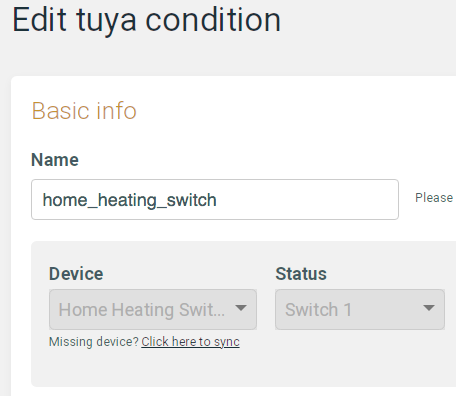
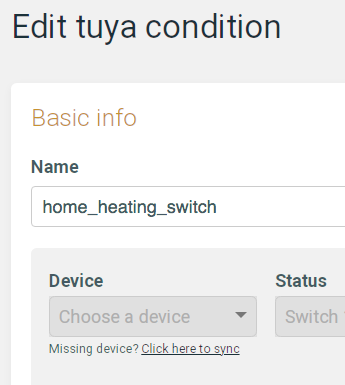
Another little glitch you could investigate is on the Edit Condition page. If you click the “Missing device? Click here to sync”, the Tuya device name disappears but the selection box Choose a Device is greyed out. Again, back out without saving and the device is still in place, but maybe if you were to save, the device would be lost. Didn’t try that! See screenshots:
After clicking “Click here to sync” - but the drop-down is grey and inoperable:
Thanks for the detailed description!
Thanks for the detailed description!
@pebneter Glad you like it, Philipp!! Actually, yesterday I had to replace three Tuya sensors, which I had to include in Tuya with new names, of course. Because the re-sync dropdown wasn’t working, I then had to make new Apilio/Tuya Devices and Device Conditions wherever these devices were used - I don’t think there was a quicker way.
1 Like
Hi @johnmann ,
yes, that’s correct. If you replace devices, you need to create new conditions. It would be a bit complicated to handle a device exchange after a condition was created.
I fixed the bug you mentioned above by hiding the “sync” link when editing an existing device condition, as changing the device is not supported and the sync process was messing up the UI.